SMS Opt In

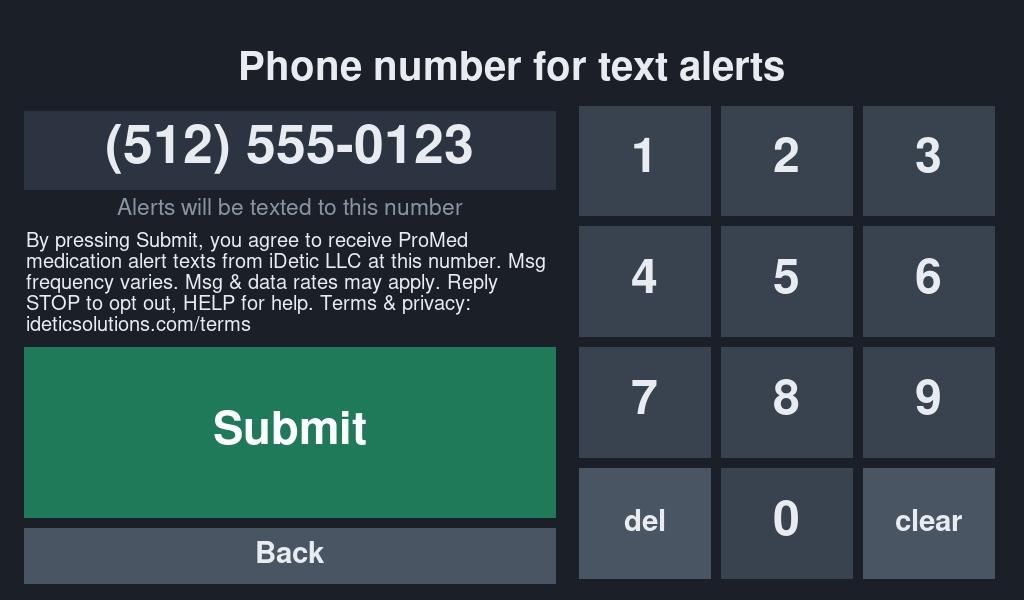
This page shows how users opt in to ProMed Alerts text messages sent by iDetic LLC.

How opt-in works

  1. On the ProMed medication-monitoring device, the user or caregiver chooses to receive alerts by text.
  2. An on-screen number pad appears. They type their own mobile number.
  3. The screen shows this consent text directly above the Submit button:”By pressing Submit, you agree to receive ProMed medication alert texts from iDetic LLC at this number. Msg frequency varies. Msg & data rates may apply. Reply STOP to opt out, HELP for help. Terms & privacy: ideticsolutions.com/terms”
  4. They press Submit. The number receives a confirmation text:”ProMed (by iDetic): You’re signed up for medication alerts. Msg frequency varies. Msg & data rates may apply. Reply HELP for help, STOP to opt out.”

Opt-in screen

Messages sent

Only transactional alerts about the device: Under Medicated, Over Medicated, Take Medicine and Call For Help. No marketing. Example:

“ProMed alert: Over Medicated detected on ProMedPal3 at 2:14 PM. Reply STOP to opt out.”

Terms & Conditions · Privacy Policy